
 Jaigouk.Kim
 rsapberry pi zero w for elixir dev env
Motivation
Recently, I watched google i/o tech talks and I found that progressive web + physical web is quite interesting. I had an idea that i want to play with Bluetooth Low Energy devices. For prototying the idea, I bought a raspberry pi zero w. (yup. this is my second one). Before watching the techtalk, rpi0 meant nothing to me. Because I always wanted to have powerful small computers that I can make a cluster. Now, it makes sense to play with rpi0w. it’s a good fit for me to play with it to prototype physical web related ideas.
prep
- install virtualbox and ubuntu. prepare your disk that is larger than 16GB if it’s a desktop version of ubuntu.
- docker should be up and running locally
tl;dr
In your mix.exs add rpi0_ble
 def deps("rpi0") do
    [{:nerves_runtime, "~> 0.1.0"},
     {:"nerves_system_rpi0_ble", github: "jaigouk/nerves_system_rpi0_ble", tag: "v0.0.4", runtime: false},
     {:nerves_interim_wifi, "~> 0.1.0"}]
  end
burn your sdcard with following commands.
MIX_TARGET=rpi0 mix deps.get
MIX_TARGET=rpi0 mix firmware
#Burn to an SD card with
MIX_TARGET=rpi0 mix firmware.burn
the image has iptables, ssh, erlang, node.js, bluez, git, vi, etc. Because it’s for prototyping a ble app and testing it.
configure the image
I need to customize the default rpi0 because i need to add bluez. I found this tutorial from adafruit. Since nerves-project is using buildroot, there must be a way to add the libarary to my rpi0. And then I found this blog post
I referenced this slide and getting started doc from nerves-project.
install and download libraries we need
sudo apt-get install git g++ libssl-dev libncurses5-dev bc m4 make unzip cmake
git clone [email protected]:nerves-project/nerves-system-br.git
git clone [email protected]:jaigouk/nerves_system_rpi0_ble.git
mkdir -p ~/.nerves/cache/buildroot
nerves_system_br/create-build.sh nerves_system_rpi0_ble/nerves_defconfig ~/.nerves/cache/buildroot
cd ~/.nerves/cache/buildroot
Now, let’s configure our linux image.
- Select base packages by running
make menuconfig - Modify the Linux kernel and kernel modules with
make linux-menuconfig - Enable more command line utilities using
make busybox-menuconfig
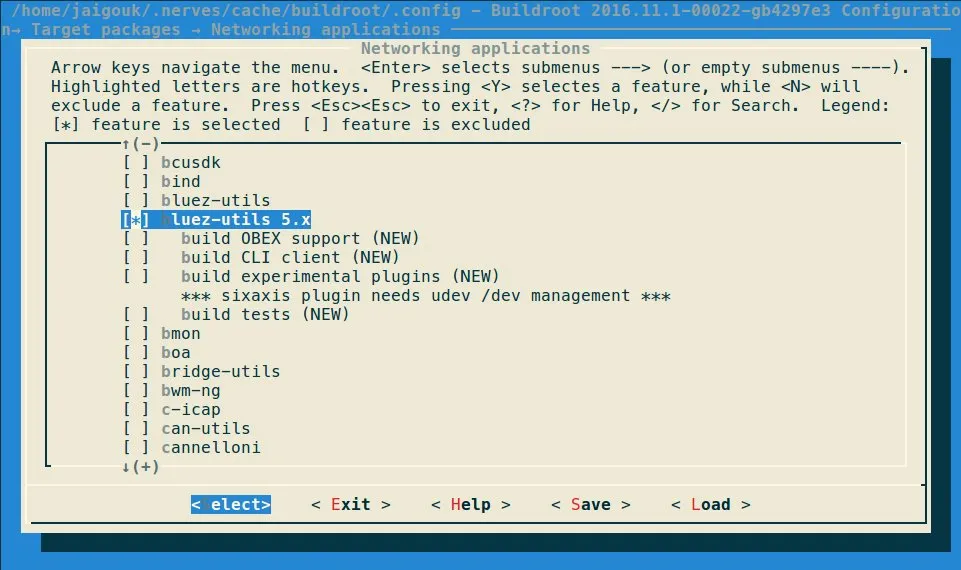
make menuconfig will launch gui that helps you to add extra packages. I want to add iptables, git
│ Prompt: git
│   Location:
│     -> Target packages
│       -> Development tools
iptables
│ Prompt: iptables
│   Location:
│     -> Target packages
│       -> Networking applications
open ssh
│ Prompt: openssh
│   Location:
│     -> Target packages
│       -> Networking applications
openssl
 Prompt: openssl
│   Location:
│     -> Target packages
│       -> Libraries
│         -> Crypto
you can even find nginx, wireshark,etc in networking applications.
Run make savedefconfig after make menuconfig to update the nerves_defconfig in your System. it will spit out results like this.
umask 0022 && make -C /home/jaigouk/nerves_system_br/buildroot-2016.11.1 O=/home/jaigouk/.nerves/cache/buildroot/. savedefconfig
  GEN     /home/jaigouk/.nerves/cache/buildroot/Makefile
linux-menuconfig
│ Prompt: Bluetooth Low Energy (LE) features
│   Location:
│     -> Networking support (NET [=y])
│       -> Bluetooth subsystem support (BT [=y])
Run make linux-savedefconfig and cp build/linux-x.y.z/defconfig <your system>
umask 0022 && make -C /home/jaigouk/nerves_system_br/buildroot-2016.11.1 O=/home/jaigouk/.nerves/cache/buildroot/. linux-savedefconfigwe can add vim, grep, ifconfig, ping, ps, top, free, etc with following command. busybox-menuconfig only works when busybox is enabled.
make busybox-menuconfigthis is what getstarted doc says.
If your system doesn’t contain a custom Linux configuration yet, you’ll need to update the Buildroot configuration to point to the new Linux defconfig in your system directory. The path is usually something like
$( )/linux-x.y_defconfig.
For Busybox, the convention is to copybuild/busybox-x.y.z/.configto a file in the System repository. Like the Linux configuration, the Buildroot configuration will need to be updated to point to the custom config.
/home/jaigouk/.nerves/cache/buildroot/build/busybox-1.25.1/.configSo I copied defconfig to nerves_system_rpi0_ble/linux-4.4.defconfig and .config to nerves_system_rpi0_ble/nerves_defconfig
now my custom rpi0 config is ready to be used.